Designing Jioworks Team Page - UI/UX Case Study
JioWorks is a digital work management platform designed to empower teams to collaborate seamlessly, communicate effectively, and monitor and manage all your tasks with ease. It helps teams to be agile, increase transparency, and streamline their work processes.
B2B and B2C
UI/UX Designer
1 Product Manager
1 Product Designer
and 6 Developers
Problem Statement
In our organization, people used Excel for work management, but it caused several problems. It was hard to break down tasks, manage subtasks, and collaborate effectively. Communicating and sharing information was inefficient, leading to missed deadlines and unclear responsibilities. Managing multiple projects and navigating through them was also difficult.
Solutions
To address these pain points, we are looking for a new all-in-one tool that can handle collaboration, communication, and task management efficiently. This tool should provide a hierarchy of projects, making it easier to organize and manage tasks across different teams and projects.
Objectives
Increase Clarity
Keep track of the team’s progress with a clear understanding of what they are working on and by when things will get completed.
Enhance Collaboration
Help your teams create, connect & collaborate with just a few clicks and access all their work in one place, so that no key information is missed out.
Improve Communication
Streamline information flow and build transparency across teams. Increase efficiency and engagement with real-time communication.
Target Users
Managers
Individual Contributors
User Research
We conducted research with various departments, including Marketing, Sales, Procurement, Development, Operations, HR, etc... Our goal was simple: understand how everyone works together.
Challenges
We wanted to find out what problems teams were facing. We asked them how they managed projects and if they had any difficulties with their current tools.
Work Processes
We looked into how teams used their current methods for tracking tasks and deadlines. We wanted to see if their ways of working were causing any issues or delays.
Teamwork
We asked teams how they worked together and communicated. We wanted to understand if there were any problems in coordinating tasks, sharing updates, and managing feedback.
Competitor Analysis
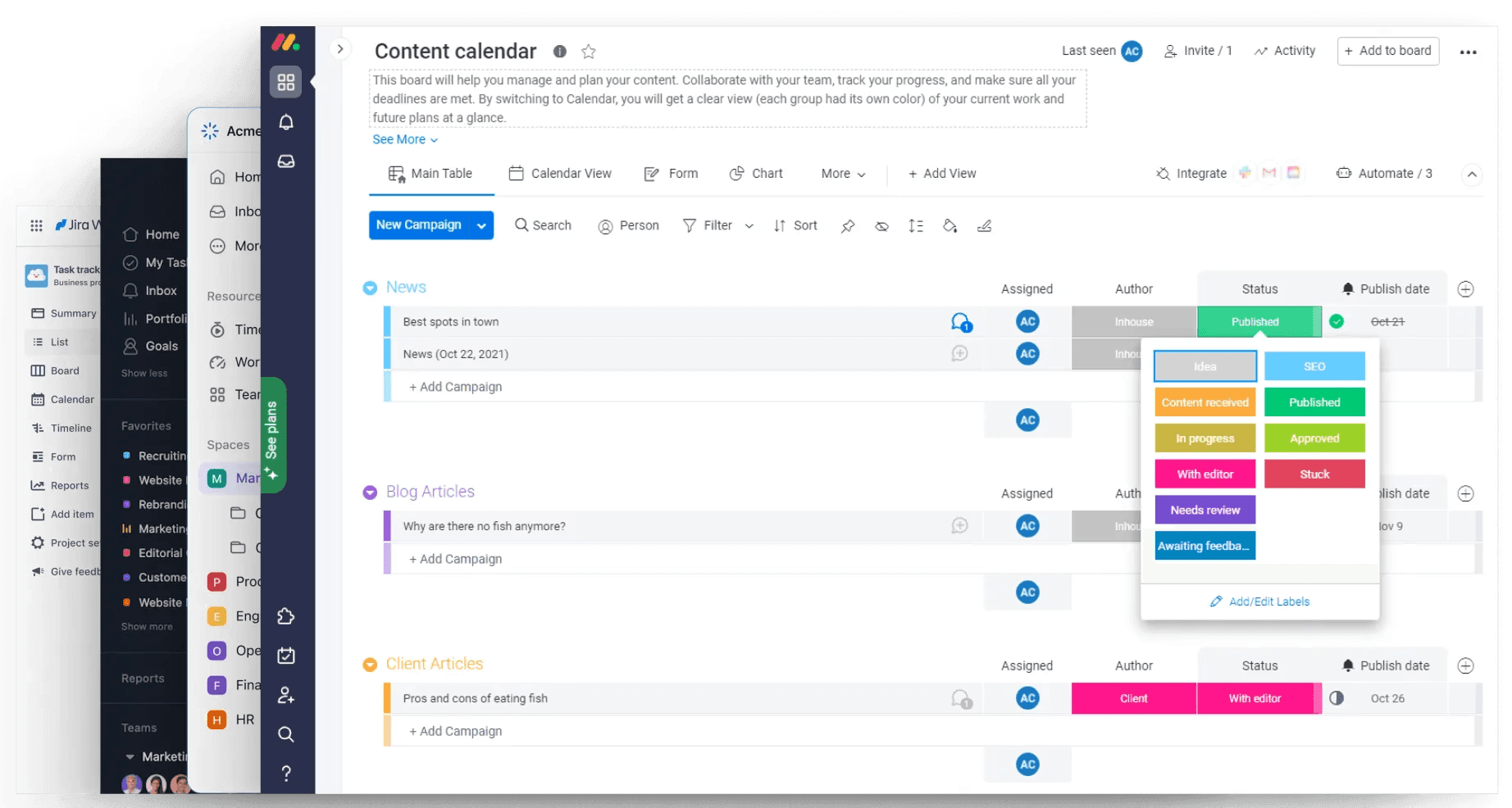
To ensure that JioWorks meets the needs of our users and stands out in the market, we conducted a thorough competitor analysis. We researched several leading tools, including Monday.com, Asana, ClickUp and Jira, to understand how they work, identify their key features, and uncover common pain points.
Design Strategy
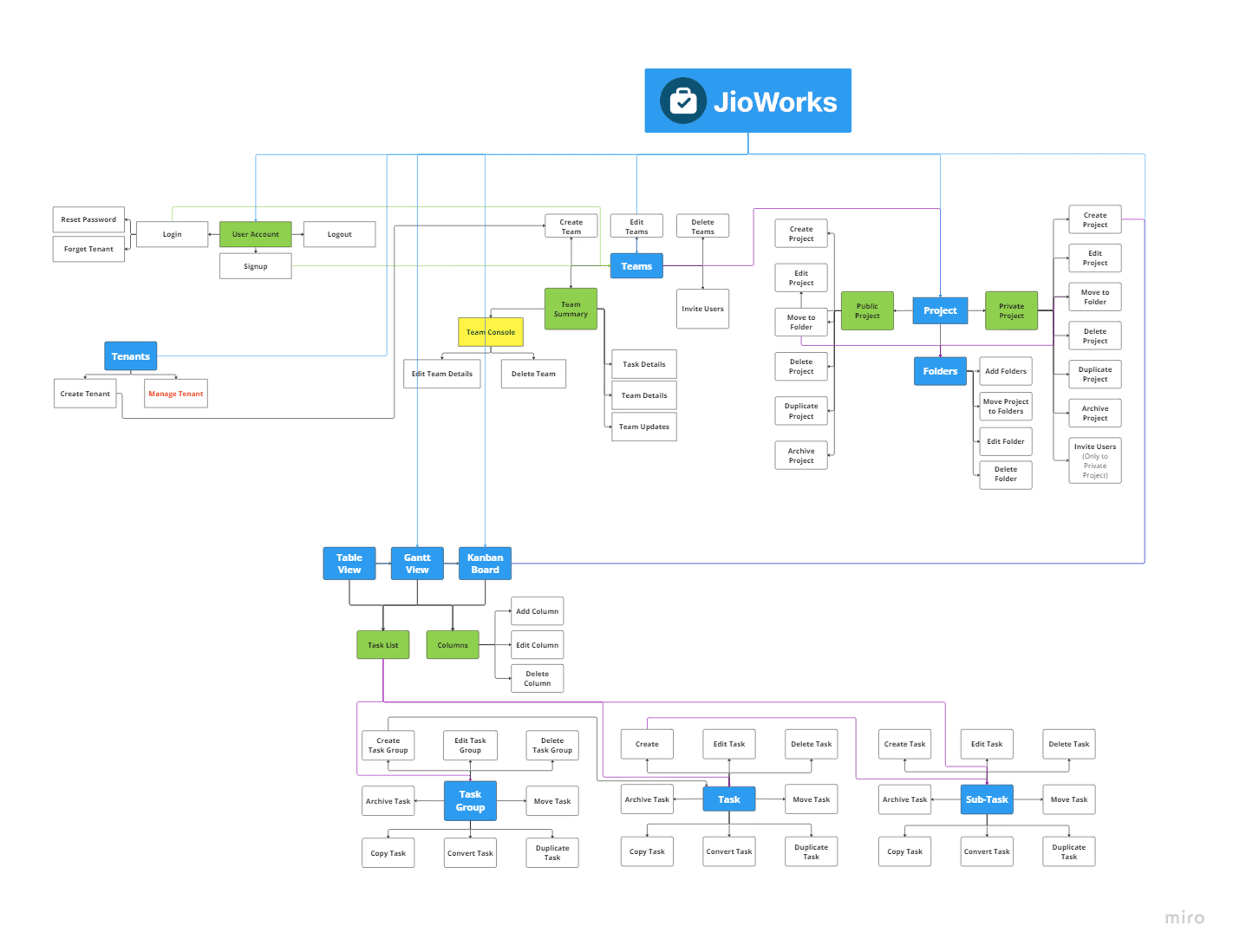
Before finalizing the design, we established a clear structure hierarchy for JioWorks, reflecting real-life organizational structures to enhance usability and efficiency.This hierarchy sets the foundation for how we organize and access information within JioWorks.
Tenants
Represents individual organizations or departments.
Teams
Dedicated groups for collaboration.
Folder
(Optional) Organize projects by topic.
Projects
Define core deliverables, objectives, and milestones.
Taskgroup
Break down projects into manageable chunks.
Task
Assign individual items to team members.
Subtask
Further refine complex tasks for detailed focus.
Overview of Key Design Considerations
To build on this structure, we focused on several key areas to ensure our design strategy is comprehensive and effective.
Intentions
User-Centered Design
Simplify Task Management
Enhance Collaboration
Streamline Communication
Tech Constraints
Security and Privacy
Performance Optimization
Scalability
Success Factors
User Adoption
Improved Productivity
Seamless Transition
Positive Feedbacks
General Task
User Research
Competitor analysis
Prototype Test
Iterate based on feedback
Implement Key Features
Ensure Robust Security
Provide Training and Support
User Flow Diagram
This user flow diagram that we created with product managers and getting feedback from stakeholders for clarity of the process
Final Solution
Navigation Panel for Teams & Projects
Problem
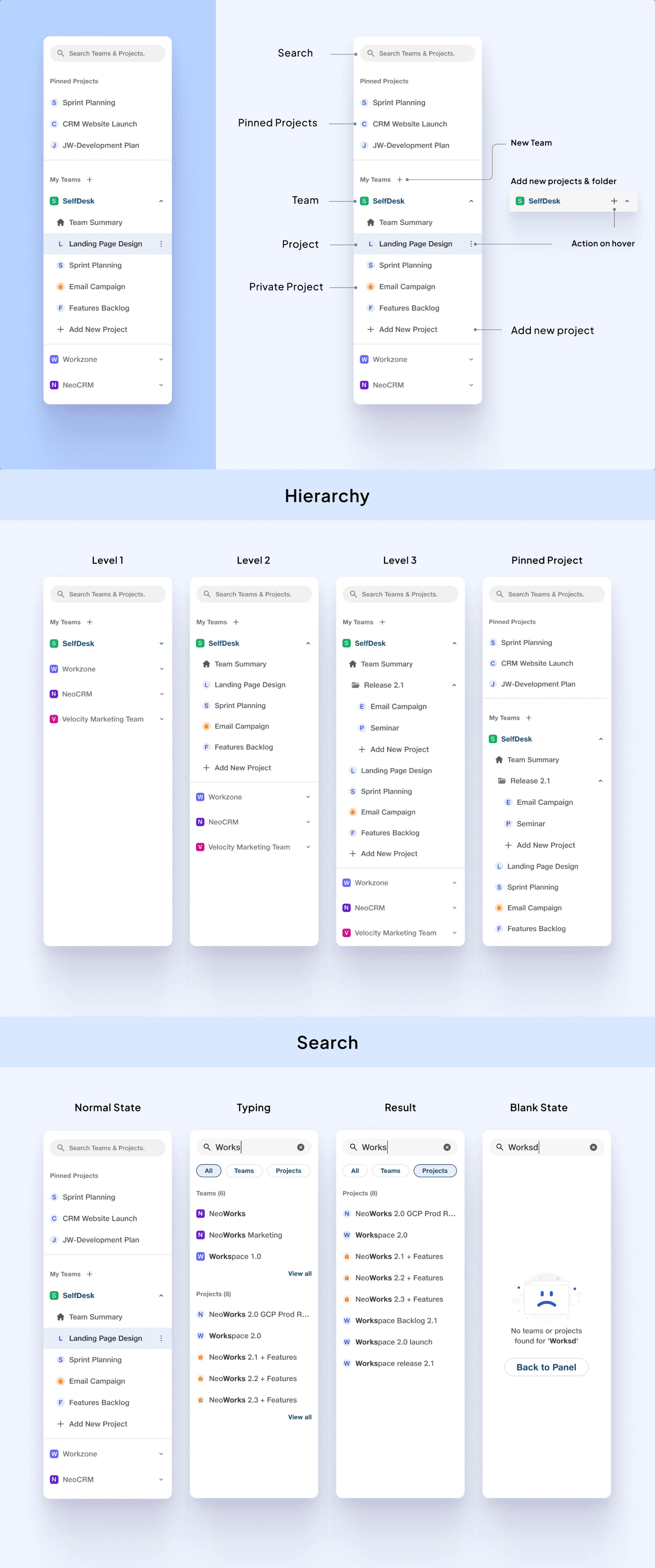
Many JioWorks users manage multiple projects at once, using separate spreadsheets for each. This can be a mess! Finding information is a hassle, switching between projects takes time, and keeping track of everything is a struggle.
Solution
JioWorks solves this problem with the project panel. It's like a central dashboard for all your projects. User don't have to search through spreadsheets anymore - user can see everything in one place! Switching between projects is easy, and real-time collaboration keeps everyone updated. Users can also create new teams and projects from this panel.
Invite People In Projects
Problem
In JioWorks, the absence of a seamless collaboration and communication feature hindered users from effectively managing projects. Users found it challenging to invite team members, assign tasks, and track progress in a single platform, leading to fragmented workflows and miscommunication.
Solution
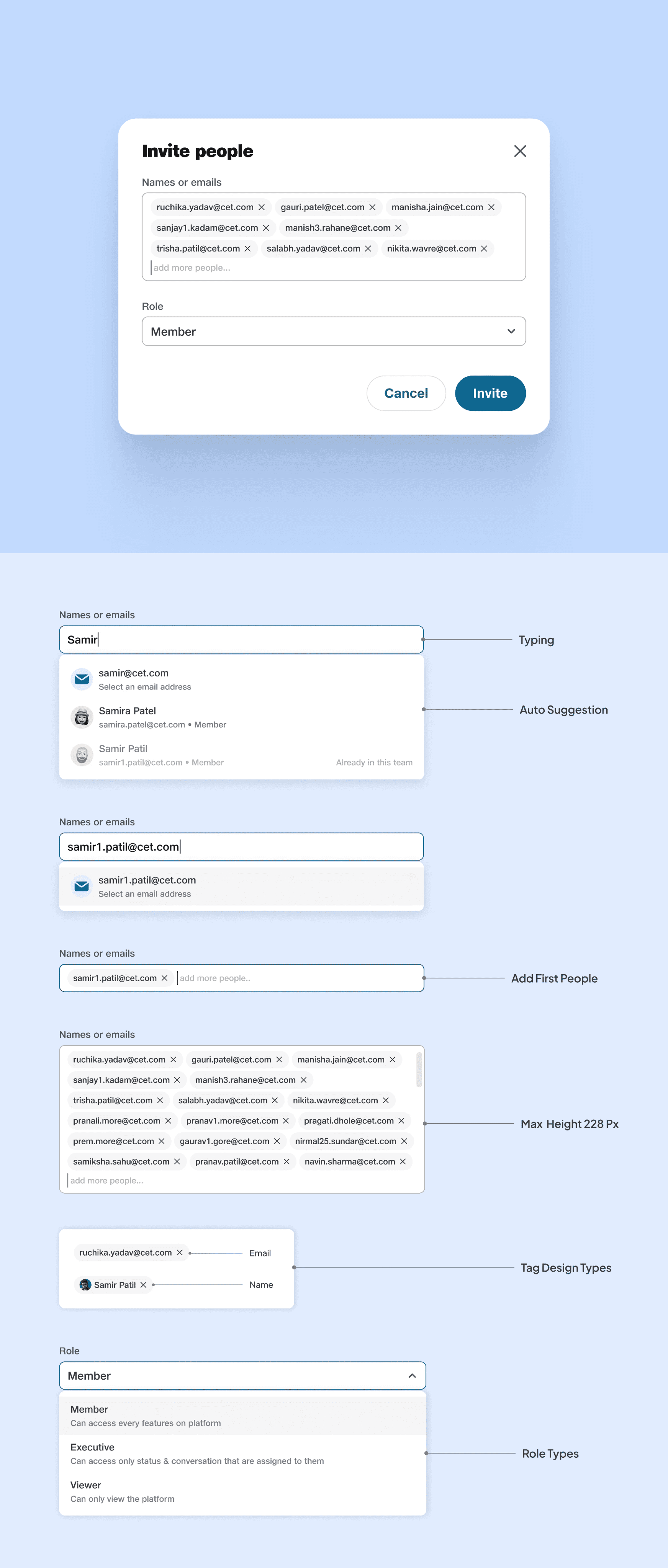
To address this issue, JioWorks introduced the invite feature, allowing project creators to invite individuals to collaborate on projects. This feature offers three distinct roles:
Member: Members have full access to the project, enabling them to edit and manage tasks, fostering a sense of ownership and responsibility.
Executive: Executives can update their task statuses and access communication related to their tasks, ensuring transparency and accountability.
Viewer: Viewers can only see the project without any editing capabilities, preventing unintended changes and maintaining project integrity.
Structure Hierarchy for Task Management
Problem
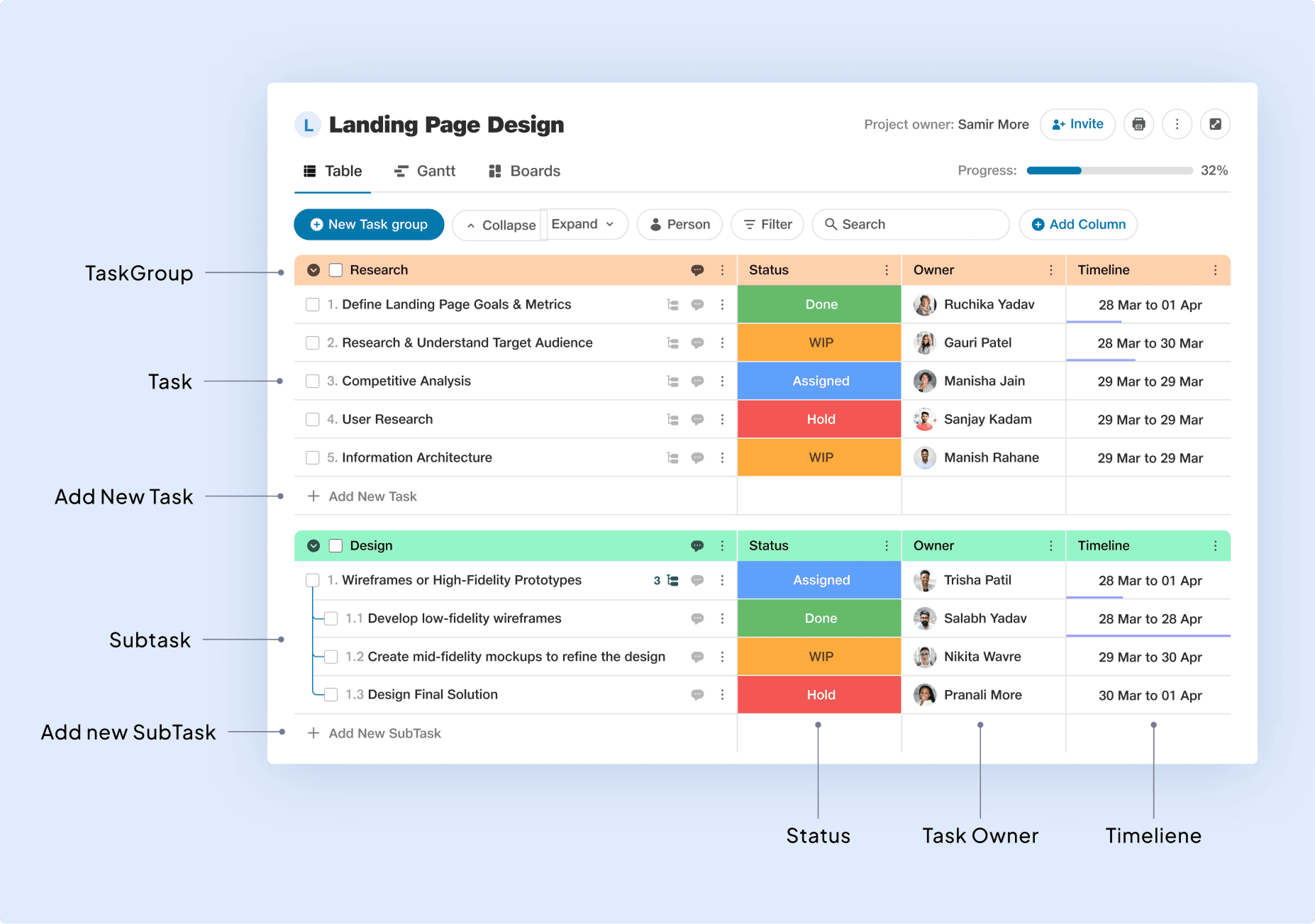
When designing JioWorks, we identified that many users were accustomed to using Excel for project management due to its familiar tabular format. However, Excel lacks collaborative features, making it less suitable for team projects. Users needed a platform that offered the familiarity of Excel but with added collaborative and task management functionalities.
Solution
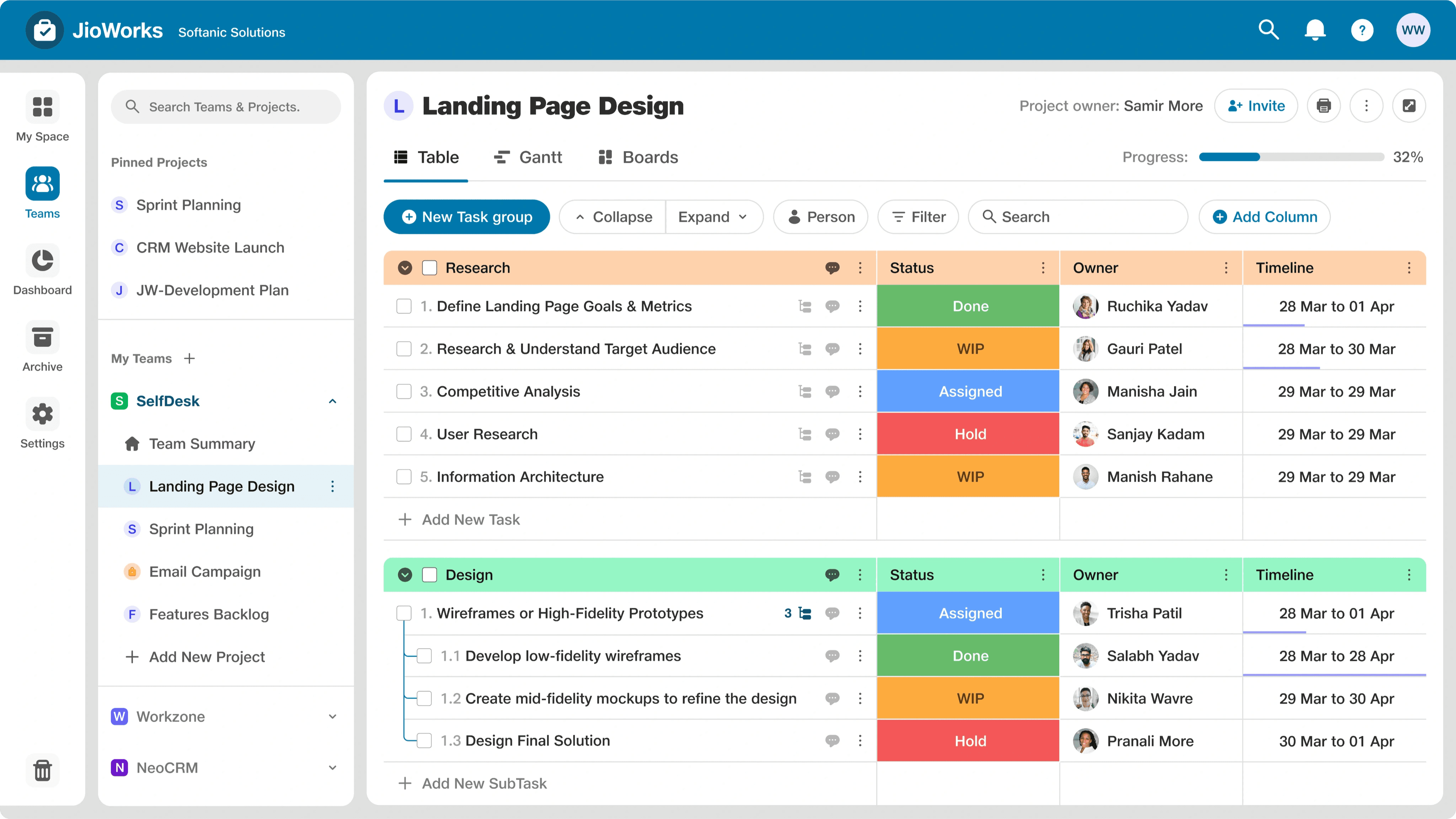
To address this, we designed JioWorks with a table format as the default view for project breakdown. This format includes a hierarchy of task groups, tasks, and subtasks, similar to Excel. We also included default columns for status, task owner, and timeline, which are commonly used in project management.
Status: See if a task is assigned, in progress, or done to avoid confusion.
Task Owner: Assign tasks to people to make it clear who is responsible.
Timeline: Set deadlines to keep everyone on track and avoid last-minute rushes.
Custom Column
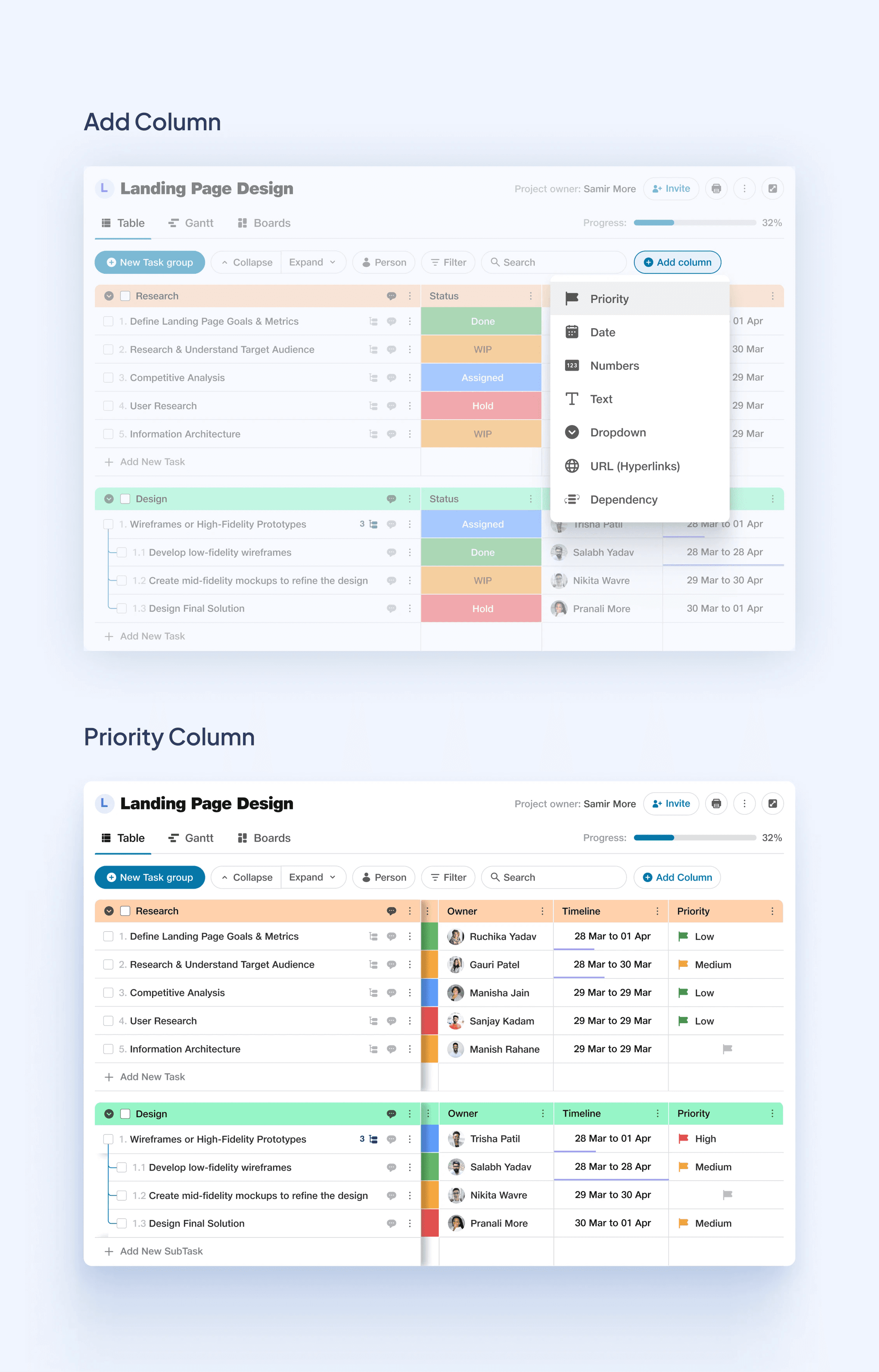
Additionally, we added the flexibility for users to add custom columns based on their specific needs. To make this customization easy, we placed an "Add Column" button at the top of the table, allowing users to tailor the table to their project requirements. We give following columns for customization.
Text: Add notes, descriptions, or any other details that help explain your tasks.
Numbers: Track quantities, budgets, or other numerical data points with ease.
Priority: Clearly mark critical tasks with a custom priority system. No more confusion about what needs attention first!
Dropdowns: Create custom lists for categories, stages, or task types. Keep things organized and easy to understand.
Dependencies: Visually map out how tasks are connected, ensuring a smooth workflow and avoiding delays.
Dates: Add important milestones or deadlines beyond the overall project timeline.
URLs: Attach relevant links or reference documents directly to tasks. Everything you need is in one place!
Communication within Task
Problem
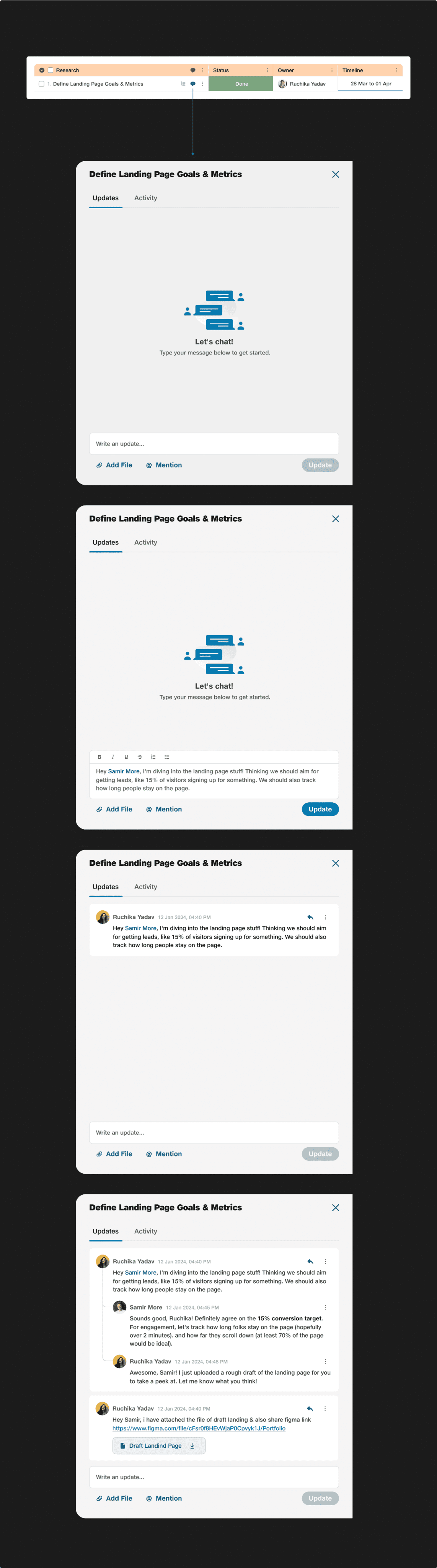
The problem was that users had to use different platforms to discuss tasks, which led to scattered information and confusion. It was hard to keep track of task-related conversations and decisions.
Solution
We wanted to streamline communication and make it easier for users to collaborate on tasks. By keeping all task-related discussions within JioWorks, we aimed to reduce confusion and improve efficiency. With above functionality.
Share Files: Attach documents, images, etc. to the chat, keeping everyone informed.
Mention Teammates: Get someone's attention quickly by mentioning them in the chat.
Stay on Track: No need to switch between different apps to chat.
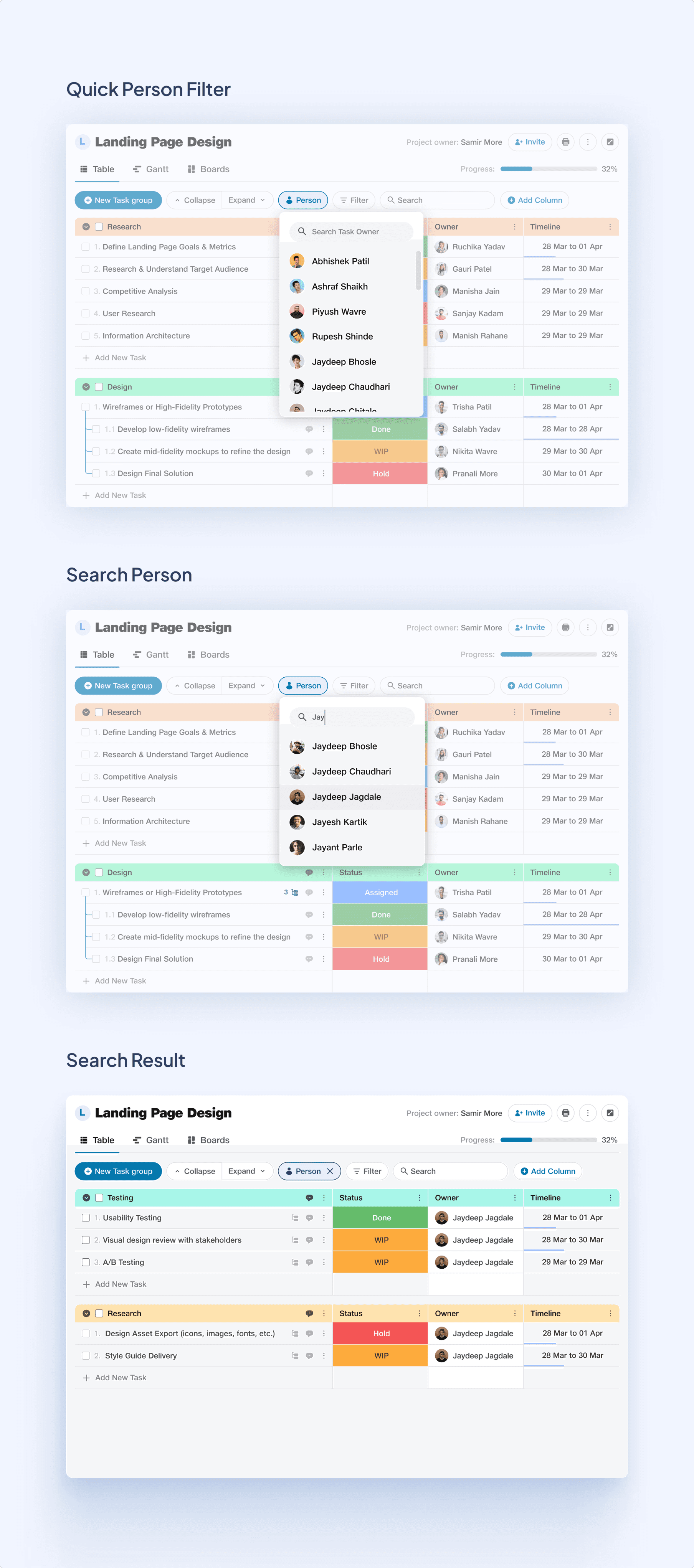
Problem
Managing busy projects can be overwhelming. It's hard to keep track of who's doing what and when things are due. This can lead to tasks being forgotten or done at the last minute.
Solution
JioWorks helps by allowing you to filter tasks by team member. This means you can see only the tasks that belong to a specific person, making it easier to track progress and prioritize work. It helps team members focus on their tasks without getting distracted, allows managers to see how everyone is doing, and promotes teamwork by showing which tasks need to be done together. JioWorks makes it easier to stay organized, communicate effectively, and get things done on time.
Problem
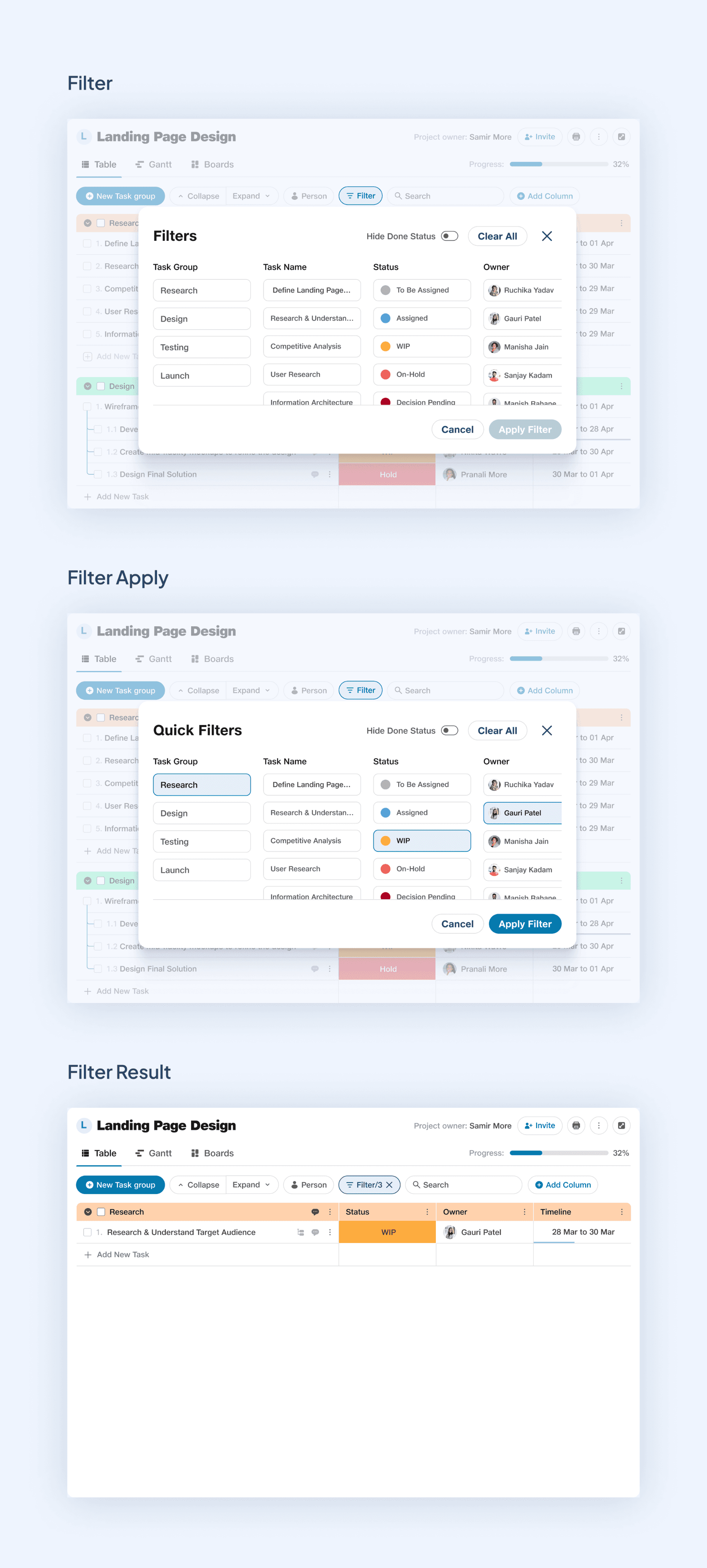
The problem was that users struggled to find specific tasks and information quickly. In a busy project, it was hard to sort through all the tasks and subtasks to find what they needed.
Solution
We wanted to make task management easier and more efficient for users. We solved it by creating the Advanced Filter feature. This tool lets users select specific criteria to narrow down their search. They can filter by task group, status, task owner, and other important columns. This way, they can quickly find the exact tasks or information they need without wasting time.
Impact
50%
Increase on time
completion
35%
Increase in Work
Efficiency
30%
Improvement in
execution
Learnings
This project taught me a lot! I learned that every project is different and comes with its own set of challenges. It also showed me the importance of teamwork in product design. Working together, sharing ideas, and incorporating feedback is key to creating great designs. This experience has been really rewarding, and I look forward to applying what I've learned to future projects.
I hope you find this case study helpful and interesting. Thank you for reading! 🙂